

Hands-on Review: Logitech Brio 4K a webcam with cinematic flair
Fri, 31st Oct 2025
There's a quiet confidence about the Logitech Brio 4K.
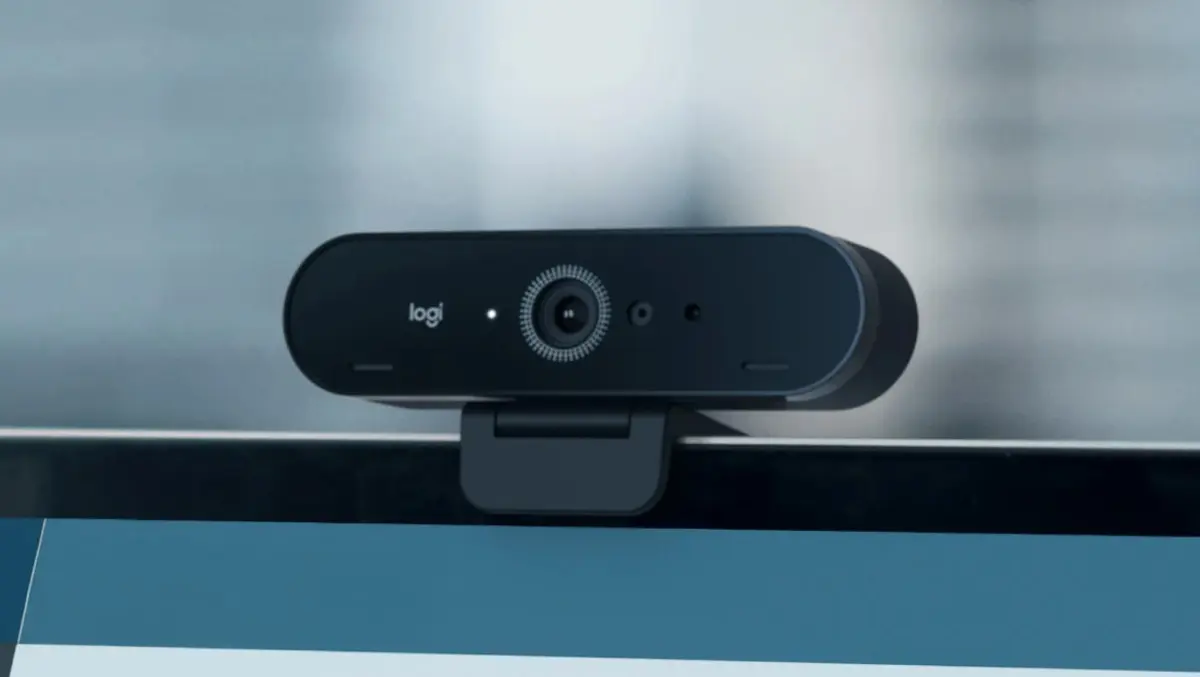
It doesn't shout for attention - it earns it. Sleek, compact and effortlessly refined, the Brio sits atop a monitor like a piece of minimalist tech sculpture: all soft matte black, cool metallic accents, and that unblinking glass eye, ready to capture your best side.
Logitech has long balanced function with finesse, and the Brio carries that tradition forward. The build feels solid yet never heavy - a considered blend of metal and premium polymer. Its curved edges and understated finish help it disappear into any setup, whether that's a minimalist home office or a streamer's neon-lit studio. It looks every bit the premium device: quietly professional, never overdone.
A detachable USB-C cable gives it flexibility, while the mount grips firmly to both slim laptop lids and chunkier displays. Underneath, a tripod thread sits waiting for anyone chasing a more cinematic angle.
Design and Feel
Every detail of the Brio feels deliberate.
The lens housing catches light with a subtle gleam, and the central sensor - shielded by clear, reflective glass - gives off that reassuring shimmer of precision engineering. This isn't a flimsy webcam; it feels built, not just assembled.
Still, it has its quirks. The camera doesn't swivel or tilt, which feels oddly restrictive for something this premium. But once positioned, it holds its stance with quiet poise - a set-and-forget kind of reliability.
It's the sort of device that fades from sight but lifts your entire setup. You stop thinking about the hardware - you just notice that you look sharper, clearer, more "on".
Image and Lighting
The Brio's greatest strength? Image quality - quite simply, it's outstanding for a webcam.
Switch it on and your feed appears crisp, detailed and alive. Even in default mode, the Brio captures an impressive level of clarity: fabric texture, the glint in your eye, the fine lines and details that most webcams blur into oblivion. It feels more cinematic than corporate.
Logitech's RightLight 3 tech deserves real credit. In soft morning light, it maintains natural warmth without washing out. Under the cold glare of office LEDs, it rebalances exposure to keep tones believable. And in dim, late-night lighting, it still pulls useable detail from near-darkness - not perfect, but far ahead of the pack.
Dynamic range is strong, too. Bright windows and tricky backlighting won't plunge your face into shadow - a quiet victory for anyone who's spent too long wrestling with uneven light.
At 1080p, it's sharp and fluid, perfect for day-to-day calls.
Switch to 4K, and the jump is instant - colours deepen, lines define, and skin tones look true. It's the visual equivalent of moving from broadcast to film.
That said, lighting remains king. Give the Brio decent illumination - a ring light, a window, anything soft - and it rewards you with near-studio clarity. Leave it in the dark, and even this standout performer will flatten a little.
Colour and Mood
The Brio leans slightly warm, flattering skin and softening harsh contrast. Reds can run a little hot straight out of the box, but manual white balance brings everything into line quickly. Once tuned, the palette feels natural and organic - rich without being overcooked.
There's a subtle cinematic quality to the footage. Shadows hold depth, highlights glow gently, and the result feels more like an intentional portrait than a webcam feed. It's the kind of image that makes even a routine meeting look like an interview setup.
Sound
Dual microphones are neatly integrated into the frame, picking up voice with clarity and just enough room tone to feel natural. For calls, they're perfectly capable - clean, warm and free from that metallic echo that cheaper webcams can't seem to shake.
For recording or streaming, though, a dedicated mic remains essential. The Brio's visuals are so good that it deserves matching audio.
Software and Setup
Setup is seamless: plug it in and the Brio's ready to go. No drivers, no extra steps. It plays nicely with every major platform - Zoom, Teams, OBS, Discord, Skype - and works instantly.
Logitech's companion apps, Logi Capture and G Hub, let you fine-tune brightness, exposure and field of view. You can narrow it to 65° for a tight portrait or open it up to 90° for a wider shot. Both apps are clean and straightforward, though OBS remains the best choice if you want to tap into the Brio's full 4K potential.
The camera remembers your chosen field of view, though other settings can reset after unplugging - a mild annoyance rather than a dealbreaker.
Everyday Use
In daily use, the Brio becomes invisible - and that's its charm.
It integrates so smoothly that you stop noticing it's there, until you catch your reflection and realise you look genuinely good. It makes you feel less "on a call" and more "on camera".
Whether you're jumping into a Monday meeting or recording a one-on-one interview, focus stays precise, movement is smooth and exposure adapts gracefully as lighting shifts. There's a softness to the presentation - flattering but never artificial. It's technology that understands faces.
Verdict
The Logitech Brio 4K is a masterclass in modern webcam design - elegant, intelligent and quietly powerful. It turns the act of being on camera into something closer to being on set.
Yes, there are small caveats - colour occasionally needs a tweak, and the fixed mount limits flexibility - but in terms of image quality and light performance, the Brio is comfortably ahead of most rivals.
The webcam is an investment that earns its keep every time you hit "join meeting." In an era where first impressions often happen through pixels, the Brio 4K makes sure yours lands clearly, confidently and beautifully lit.
In short: the Logitech Brio 4K doesn't just capture how you look - it captures how you come across.